
Rechargeable 2.4G RGB Light USB Wireless Gaming Mouse Model- M30
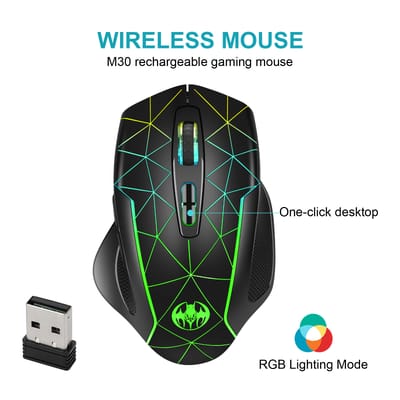
Mouse Type: 2.4G connectivity USB Wireless Gaming MouseModel: M30Mouse Size: Ordinary Rat (100-120mm)Connect To Computer: WirelessPhotoelectric Resolution: 3200Number Of Keys: 7Interface: USBWireless Transmission Frequency: 2.4GHzWhether To Support Ergonomics: SupportResolution Adjustment: Three Gear and BelowOperating Distance: 10mWay Of Working: PhotoelectricRolling: Four -Way RollerProduct Weight: 0.15Color: BlackMaterial: ABSKey life: 5 million timesWork: PhotoelectricityBattery capacity: 500mAh(Chargeable Lithium Battery)Charming Cable Length: 50cmProject Type: Ergonomics Optical MouseResolution: 800,1200,1600.(1200dpi Default)Rated voltage / current: 3.7V / 10mAPower type: rechargeable Charging Time 2H, Working Time 150H)Buttons: 2 Buttons and 1 Round (Middle Mutton) and Dpi keySystem requirements: Win XP / Win7 / Win8 / 10/ Mac OSProduct weight:95gItem size: 11.4 *5.6 * 4.5cmInstallation and use steps:1. Remove the wireless mouse from the box.2. Remove the mini receiver installed in the bottom of the mouse, insert the computer's USB interface, plug and play.3.This product is a built-in lithium battery. You only need to set the bottom switch to the ON position Package List: 1 * 2.4 G Wireless Mouse 1 * USB Receiver 1 * USB Charging Cable(50cm)Project Type: Ergonomics Optical MouseResolution: 800,1200,1600. (1200dpi Default)Rated voltage / current: 3.7V / 10mApower type: rechargeable Charging Time 2H, Working Time 150H)Buttons: 2 Buttons and 1 Round (Middle Mutton) and Dpi keySystem requirements: Win XP / Win7 / Win8 / 10/ Mac OSProduct weight: 95g 17. Item size: 11.4 *5.6 * 4.5cmInstallation and use steps:1. Remove the wireless mouse from the box.2. Remove the mini receiver installed in the bottom of the mouse, insert the computer's USB interface, plug and play.3.This product is a built-in lithium battery. You only need to set the bottom switch to the ON positionPackage List: 1 * 2.4 G Wireless Mouse 1 * USB Receiver 1 * USB Charging Cable(50cm)
CHINA MALL
Category List
All products
Sports & Outdoors
Electronics & Gadgets
Accessories & Jewelry
Baby Care
Home & Furniture
Toys & Games
Pet Supplies
Grocery
Pharmaceuticals
Utilities
Food & Beverage
Health & Wellness
Books & Media
Beauty & Cosmetics
Shoes & Footwear
Clothing & Apparel
Details:
- WarrantyNo Warranty
- Mouse Type: 2.4G connectivity USB Wireless Gaming Mouse
- Model: M30
- Mouse Size: Ordinary Rat (100-120mm)
- Connect To Computer: Wireless
- Photoelectric Resolution: 3200
- Number Of Keys: 7
- Interface: USB
- Wireless Transmission Frequency: 2.4GHz
- Whether To Support Ergonomics: Support
- Resolution Adjustment: Three Gear and Below
- Operating Distance: 10m
- Way Of Working: Photoelectric
- Rolling: Four -Way Roller
- Product Weight: 0.15
- Color: Black
- Material: ABS
- Key life: 5 million times
- Work: Photoelectricity
- Battery capacity: 500mAh(Chargeable Lithium Battery)
- Charming Cable Length: 50cm
- Project Type: Ergonomics Optical Mouse
- Resolution: 800,1200,1600.(1200dpi Default)
- Rated voltage / current: 3.7V / 10mA
- Power type: rechargeable Charging Time 2H, Working Time 150H)
- Buttons: 2 Buttons and 1 Round (Middle Mutton) and Dpi key
- System requirements: Win XP / Win7 / Win8 / 10/ Mac OS
- Product weight:95g
- Item size: 11.4 *5.6 * 4.5cm
- Installation and use steps:
1. Remove the wireless mouse from the box.
2. Remove the mini receiver installed in the bottom of the mouse, insert the computer's USB interface, plug and play.
3.This product is a built-in lithium battery. You only need to set the bottom switch to the ON position
Package List: 1 * 2.4 G Wireless Mouse 1 * USB Receiver 1 * USB Charging Cable(50cm)
Project Type: Ergonomics Optical Mouse
Resolution: 800,1200,1600. (1200dpi Default)
Rated voltage / current: 3.7V / 10mA
power type: rechargeable Charging Time 2H, Working Time 150H)
Buttons: 2 Buttons and 1 Round (Middle Mutton) and Dpi key
System requirements: Win XP / Win7 / Win8 / 10/ Mac OS
Product weight: 95g 17. Item size: 11.4 *5.6 * 4.5cm
Installation and use steps:
1. Remove the wireless mouse from the box.
2. Remove the mini receiver installed in the bottom of the mouse, insert the computer's USB interface, plug and play.
3.This product is a built-in lithium battery. You only need to set the bottom switch to the ON position
Package List: 1 * 2.4 G Wireless Mouse 1 * USB Receiver 1 * USB Charging Cable(50cm)
Rechargeable 2.4G RGB Light USB Wireless Gaming Mouse Model- M30
Out of stock699 BDT
No more items remaining!
Details:
- WarrantyNo Warranty
- Mouse Type: 2.4G connectivity USB Wireless Gaming Mouse
- Model: M30
- Mouse Size: Ordinary Rat (100-120mm)
- Connect To Computer: Wireless
- Photoelectric Resolution: 3200
- Number Of Keys: 7
- Interface: USB
- Wireless Transmission Frequency: 2.4GHz
- Whether To Support Ergonomics: Support
- Resolution Adjustment: Three Gear and Below
- Operating Distance: 10m
- Way Of Working: Photoelectric
- Rolling: Four -Way Roller
- Product Weight: 0.15
- Color: Black
- Material: ABS
- Key life: 5 million times
- Work: Photoelectricity
- Battery capacity: 500mAh(Chargeable Lithium Battery)
- Charming Cable Length: 50cm
- Project Type: Ergonomics Optical Mouse
- Resolution: 800,1200,1600.(1200dpi Default)
- Rated voltage / current: 3.7V / 10mA
- Power type: rechargeable Charging Time 2H, Working Time 150H)
- Buttons: 2 Buttons and 1 Round (Middle Mutton) and Dpi key
- System requirements: Win XP / Win7 / Win8 / 10/ Mac OS
- Product weight:95g
- Item size: 11.4 *5.6 * 4.5cm
- Installation and use steps:
1. Remove the wireless mouse from the box.
2. Remove the mini receiver installed in the bottom of the mouse, insert the computer's USB interface, plug and play.
3.This product is a built-in lithium battery. You only need to set the bottom switch to the ON position
Package List: 1 * 2.4 G Wireless Mouse 1 * USB Receiver 1 * USB Charging Cable(50cm)
Project Type: Ergonomics Optical Mouse
Resolution: 800,1200,1600. (1200dpi Default)
Rated voltage / current: 3.7V / 10mA
power type: rechargeable Charging Time 2H, Working Time 150H)
Buttons: 2 Buttons and 1 Round (Middle Mutton) and Dpi key
System requirements: Win XP / Win7 / Win8 / 10/ Mac OS
Product weight: 95g 17. Item size: 11.4 *5.6 * 4.5cm
Installation and use steps:
1. Remove the wireless mouse from the box.
2. Remove the mini receiver installed in the bottom of the mouse, insert the computer's USB interface, plug and play.
3.This product is a built-in lithium battery. You only need to set the bottom switch to the ON position
Package List: 1 * 2.4 G Wireless Mouse 1 * USB Receiver 1 * USB Charging Cable(50cm)